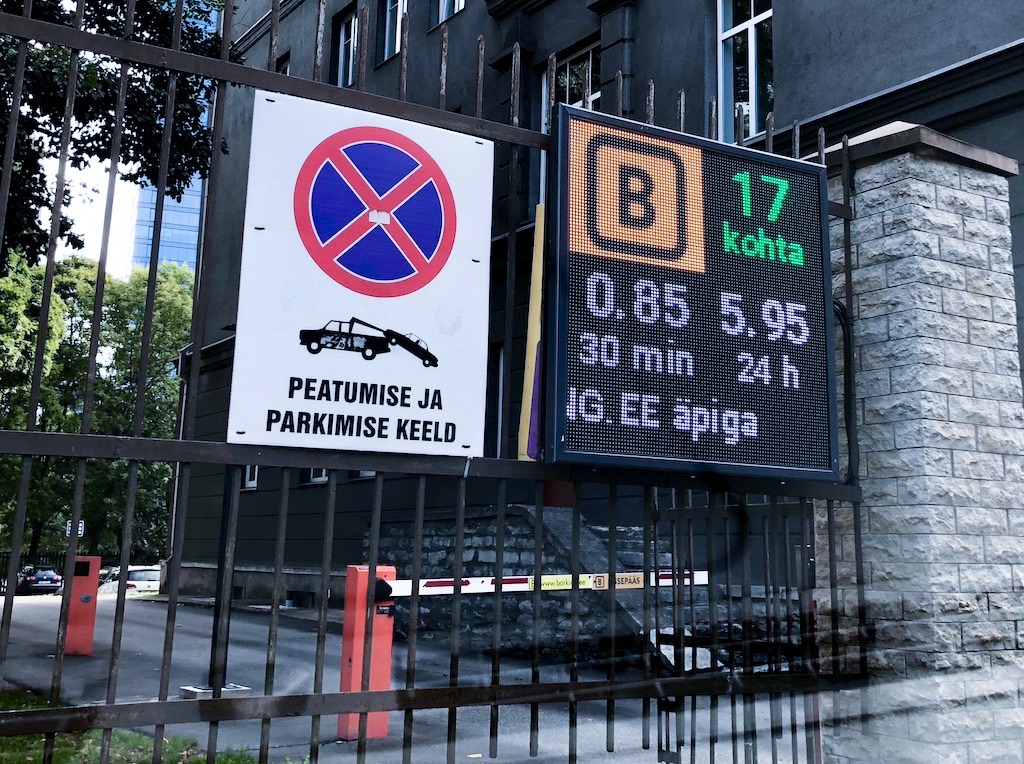
A parking guidance sign that shows the wrong number is worse than a blank one. Drivers trust it, drive to the deck it points at, and find it full. Every integrator eventually loses a sensor feed, a backend or a network link. The question is what the display does in the minutes and hours after that.
The failure nobody specs
Parking guidance tenders specify brightness, pixel pitch, IP rating and the number of digits. They almost never specify what the sign shows when the data stops. Yet that is when the sign does the most damage: the count freezes at "17", the deck fills, and the sign keeps sending cars into it.
A display that receives pushed content cannot tell whether silence means "nothing changed" or "the system is down", unless someone tells it how long a value is allowed to live.
Rule 1: every number gets an expiry
In AmpronLED every display area can carry a ttl, in seconds. When no new value arrives within that time, the area is replaced by its defaultValue.
"FREESPACES": {
  "type": "text",
  "ttl": "120",
  "defaultValue": "–"
}
How long? Tie it to how often your system normally sends. If the backend pushes on every change and a busy lot changes every few seconds, two minutes of silence is already suspicious. If you push only on change and a quiet lot can go an hour unchanged, the ttl will blank a correct number. The fix is a keep-alive: re-send the current values on a fixed interval. Every accepted update re-arms the display's timers, whether or not the value changed.
One detail that catches people out: the keep-alive must carry the layout and every area in it. An area left out of a request is blanked. "Send the current values every minute" works; "send just the count every minute" blanks everything else on the sign.
And give the whole layout one ttl rather than a different one per area. One expiry for the sign is easier to reason about, and it's the configuration we'd stand behind.
Rule 2: decide what "unknown" looks like before you need it
A dash, "–", is honest: the driver reads it as "no information" and uses their eyes. "FULL" is not honest when you don't know. A blank sign looks broken, which prompts a call to the operator, and sometimes that's what you want.
The default can be more than a single character. From AmpronLED 1.6.28, a defaultValue can be a whole request, so on expiry the display switches to a separate "guidance unavailable" layout. That layout stays up until real data returns. It is also stored as the display's last request, so a sign that reboots in the middle of an outage comes back to "guidance unavailable", not to the stale count. Rule 3 explains why that matters.
From the field: on a city bus-stop network we supply, the departure rows are configured with a 15-minute ttl. When it runs out, the rows clear and the board reads "Palun oodake... / Uuendame andmeid" ("please wait / updating data"). A passenger sees that the system knows it doesn't know.
Rule 3: a reboot can bring old data back
By default an AmpronLED display replays the last request it received when it starts (loadLastRequest, on by default since 1.3.2). That is what you want after a two-second power blip at a weighbridge. On a parking deck it has a catch.
The replayed request carries no timestamp, so the display starts a fresh ttl for it, as if it had just arrived. So after a four-hour power cut, the count from before the cut shows for one full ttl after the display starts, and only then drops to the default. Without a ttl it shows until new data arrives, however long that takes.
There is a second trap. If the count had already expired to a plain text default before the power went, a reboot brings the stale count back for another ttl, because the expiry itself is not stored.
For live counts, pick one of these:
- Turn
loadLastRequestoff instartScreen. The sign then boots blank, and stays blank until your system sends a value. - Use a request as the
defaultValue(Rule 2). The fallback is what gets stored, so the sign reboots into it. - Set
startScreen.completeUrlsto a URL on your backend. The display calls it when it starts, and your system pushes a fresh value straight away. - Keep the ttl short, so a resurrected count doesn't live long.
Rule 4: "Command received" is not "on the screen"
AmpronLED answers each request with HTTP 200 "Command received". That means the request was accepted, not that the content is showing. If your system logs a 200 as "display updated", your monitoring will report a healthy sign whose data never arrived.
Two ways to check from your side:
GET /infolists the last request each display id received, with the time it received it. After a reboot that time is the boot time, not the original send time, which is one more reason to read Rule 3.GET /screenshotreturns what the controller is rendering. It proves the content arrived. It does not prove the LEDs are lit: a power-supply or module fault leaves a dark face that still screenshots as healthy content. Only a person or a camera can confirm the face is lit.
Or let the display report in: a sendInfo cron POSTs the /info content to your backend on a schedule. A sign that stops reporting is a sign you need to visit, before a driver tells you.
Rule 5: if the display pulls, the poller needs a plan too
Some sites have no inbound network access to the display, so it polls a URL instead (pollers). When the URL stops answering (a timeout, a 5xx, an unreachable host), the display ignores the failed poll, keeps the last value and keeps polling on schedule. So the same rule applies: give every poller-fed area a ttl and an explicit defaultValue, and a dead backend ends in "no information", not a frozen count.
One case looks like a display fault and isn't. If the URL answers 200 but with JSON in the wrong shape, the mapped areas blank immediately. When a polled sign goes blank while the network is fine, check what your endpoint returned before you send someone up a ladder.
What we'd put in a spec
For a parking guidance tender, four lines cover it:
- Every live value expires after a stated time without an update.
- On expiry the display shows a defined "no information" state, not the last value.
- After power loss the display starts in its "no information" state, or fetches fresh data before it shows a count.
- The display reports its own state to the operator's system at a stated interval.
None of this needs special hardware. It needs someone to decide, before installation, what the sign should say when it doesn't know.
The full request format, including ttl, defaultValue, startScreen and pollers, is on our API page: ampron.eu/api. For a sense of the effort involved, Snabb's developer integrated their parking display in a single one-hour session (case study). If you're specifying guidance signs and want a second opinion on the failure modes, ask us.